Wide Open. Gear

The Best Portable SSDs for Video

Fast external drives to offload cards and edit 4K straight off the drive — and where the very fastest ones are worth it.

By Stephen V.Last updated How we pick

A fast portable SSD is the cheap fix that punches above its weight. Editing 4K straight off an external drive keeps your laptop’s internal storage free and your timeline smooth, and it makes offloading cards after a shoot painless. Modern USB-C SSDs are pocket-sized, tough, and fast enough to edit off directly — something that used to require a bulky desktop drive.

The main spec is speed, and here the labels matter. Most portable SSDs run around 1,050 MB/s over USB 3.2 Gen 2, which is plenty for editing 4K off the drive. The fastest drives use USB 3.2 Gen 2x2 and hit around 2,000 MB/s — genuinely useful for huge card dumps and heavy 4K/8K workflows, but onlyif your computer has a Gen 2x2 port to match. We’ve picked value, standard and high-speed options, and we’re clear about who needs the fast one.

How this is funded:we earn a commission if you buy through our links, at no extra cost to you. It never changes which product we recommend, and we’ll tell you plainly when to skip one. Full disclosure.

Quick picks

Ranked on published specs and buyer fit. Select a row to jump to the full write-up. We have not tested these products — here is exactly what we do instead.

#ProductBest forPrice
1
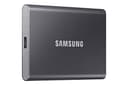
Samsung T7 Portable SSD (1TB)

Samsung T7 Portable SSD (1TB)

The default portable SSD for offloading cards and editing off an external drive. USB 3.2 Gen 2 speeds around 1,050 MB/s are fast enough to edit 4K straight off the drive, it is pocket-sized, and it is reliably cheap. Unless you need the very fastest transfers, this is the sensible buy.

Best overall
$219.00 · View on Amazon

$274.9920% off

Price as of July 28, 2026. #ad How we’re funded

2
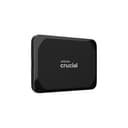
Crucial X9 Portable SSD (1TB)

Crucial X9 Portable SSD (1TB)

The value portable SSD. It matches the Samsung T7's real-world speed for editing off the drive, usually for a little less money, in a compact rubberized body. If you just want reliable, fast storage to dump cards and edit from, and the price beats the T7 when you check, buy this.

Best value
$141.28 · View on Amazon

Price as of July 28, 2026. #ad How we’re funded

3
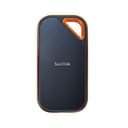
SanDisk Extreme PRO Portable SSD (1TB)

SanDisk Extreme PRO Portable SSD (1TB)

The fast SSD for people who move a lot of footage. USB 3.2 Gen 2x2 pushes up to ~2,000 MB/s — roughly double the T7 — so big card dumps and 4K/8K editing off the drive are noticeably quicker, and the IP65 body shrugs off rain and dust. You need a Gen 2x2 port to hit full speed.

Best for heavy footage
$229.99 · View on Amazon

Price as of July 28, 2026. #ad How we’re funded

The picks in full

#1Best overall

Samsung T7 Portable SSD (1TB)

The default portable SSD for offloading cards and editing off an external drive. USB 3.2 Gen 2 speeds around 1,050 MB/s are fast enough to edit 4K straight off the drive, it is pocket-sized, and it is reliably cheap. Unless you need the very fastest transfers, this is the sensible buy.

Strengths

  • ~1,050 MB/s — fast enough to edit 4K off the drive
  • Pocketable, light and shock-resistant
  • Frequently discounted and widely available

Trade-offs

  • Slower than USB 3.2 Gen 2x2 drives
  • No IP water/dust rating
InterfaceUSB 3.2 Gen 2, USB-C
SpeedUp to ~1,050 MB/s
Capacity shown1TB
Best forCard offload, 4K editing on the go

Specifications read from the manufacturer listing, on July 18, 2026.

#2Best value

Crucial X9 Portable SSD (1TB)

The value portable SSD. It matches the Samsung T7's real-world speed for editing off the drive, usually for a little less money, in a compact rubberized body. If you just want reliable, fast storage to dump cards and edit from, and the price beats the T7 when you check, buy this.

Strengths

  • ~1,050 MB/s — same real-world class as the T7
  • Compact, grippy, travel-friendly body
  • Usually undercuts the T7 on price

Trade-offs

  • Not a Gen 2x2 speed drive
  • Fewer security extras than some rivals
InterfaceUSB 3.2 Gen 2, USB-C
SpeedUp to ~1,050 MB/s
Capacity shown1TB
Best forValue card offload and editing

Specifications read from the manufacturer listing, on July 18, 2026.

#3Best for heavy footage

SanDisk Extreme PRO Portable SSD (1TB)

The fast SSD for people who move a lot of footage. USB 3.2 Gen 2x2 pushes up to ~2,000 MB/s — roughly double the T7 — so big card dumps and 4K/8K editing off the drive are noticeably quicker, and the IP65 body shrugs off rain and dust. You need a Gen 2x2 port to hit full speed.

Strengths

  • Up to ~2,000 MB/s — about double the T7
  • IP65 water- and dust-resistant body
  • Great for large card dumps and 4K/8K editing

Trade-offs

  • Needs a USB 3.2 Gen 2x2 port for full speed
  • Costs more than Gen 2 drives
InterfaceUSB 3.2 Gen 2x2, USB-C
SpeedUp to ~2,000 MB/s
DurabilityIP65 water/dust resistant
Capacity shown1TB

Specifications read from the manufacturer listing, on July 18, 2026.

How fast a drive do you need?

For most creators, a standard ~1,050 MB/s drive (like the Samsung T7 or Crucial X9) is fast enough to edit 4K off directly and offload cards quickly. The much faster ~2,000 MB/s drives (like the SanDisk Extreme PRO) are worth it only if you move huge amounts of footage or edit heavy 4K/8K — and only if your laptop has the matching USB 3.2 Gen 2x2 port, which many don’t. Check that before paying for the speed.

Look for a durable, water-resistant body if you shoot on location, and keep backups — an SSD is fast working storage, not a substitute for a proper backup. Pair one with a capable editing laptop and a fast SD card for a capture-to-edit workflow that never bottlenecks.

Frequently asked questions

Can I edit 4K video straight off a portable SSD?

Yes. A modern portable SSD at around 1,050 MB/s is fast enough to edit 4K directly, which keeps your laptop's internal drive free and your timeline smooth. It's one of the best-value upgrades to an editing workflow.

What's the difference between USB 3.2 Gen 2 and Gen 2x2?

Gen 2 tops out around 1,050 MB/s; Gen 2x2 roughly doubles that to around 2,000 MB/s. Gen 2x2 speed only helps if your computer has a Gen 2x2 port — many laptops don't, in which case a Gen 2x2 drive runs at Gen 2 speed and the extra cost is wasted.

Do I need a 2,000 MB/s SSD?

Only for very large card dumps or heavy 4K/8K editing, and only if your computer has a matching USB 3.2 Gen 2x2 port. For most creators, a standard ~1,050 MB/s drive is plenty and much cheaper. Check your ports before buying the fast one.

Is a portable SSD a backup?

No — treat it as fast working storage, not a backup. Drives can fail or be lost. Keep a separate backup of anything you can't reshoot, ideally following the 3-2-1 rule: three copies, two media types, one off-site.

How much SSD storage do I need for video?

Video eats space fast — 4K footage can be tens of gigabytes per hour. 1TB is a sensible starting point for a working drive; heavy shooters go to 2TB or more. It's cheaper to buy one larger drive than to juggle several small ones.

Sources

Keep reading