Wide Open. Gear

The Best Capture Cards

Turn a real camera or a console into a clean feed for streaming and recording — from a simple HDMI dongle to a high-frame-rate 4K card.

By Stephen V.Last updated How we pick

A capture card takes an HDMI signal — from a camera or a games console — and turns it into a clean video feed your computer can use for streaming or recording. For creators, the killer use is turning a real mirrorless camera into a “webcam”: plug the camera’s HDMI into the card, and it appears as a camera in OBS, Zoom or any app, looking far better than any webcam.

What you need depends on the job. For camera-as-webcam, a simple, cheap HDMI dongle is all you need. For capturing a PS5, Xbox or a high-refresh gaming PC, you want a card with high-frame-rate passthrough and low latency, which costs more. We’ve picked across that range and flagged which is overkill for which use, so you don’t overspend.

How this is funded:we earn a commission if you buy through our links, at no extra cost to you. It never changes which product we recommend, and we’ll tell you plainly when to skip one. Full disclosure.

Quick picks

Ranked on published specs and buyer fit. Select a row to jump to the full write-up. We have not tested these products — here is exactly what we do instead.

#ProductBest forPrice
1
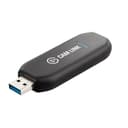
Elgato Cam Link 4K

Elgato Cam Link 4K

The little dongle that turns your mirrorless camera into the best webcam you own. Plug your camera's HDMI into one end and a USB port into the other, and it appears as a camera in any app. If you already own a good camera, this is the cheapest way to make your video calls and streams look pro.

Best for camera-as-webcam
$99.99 · View on Amazon

Price as of July 28, 2026. #ad How we’re funded

2
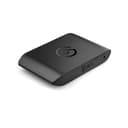
Elgato 4K X

Elgato 4K X

The high-end capture card for people recording consoles or high-frame-rate gameplay. HDMI 2.1, 4K144 passthrough and ultra-low latency mean it keeps up with the newest hardware. It is overkill for a webcam setup — buy it if you are capturing a PS5, Xbox or a high-refresh gaming PC.

Best for console/high-frame-rate
$211.99 · View on Amazon

$249.9915% off

Price as of July 28, 2026. #ad How we’re funded

3
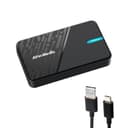
AVerMedia StreamLine MINI+ (GC311G2)

AVerMedia StreamLine MINI+ (GC311G2)

The budget capture card that covers the basics well: 1080p60 recording with 4K60 HDR passthrough, so you can capture gameplay or a camera feed without spending Elgato-4K-X money. A sensible entry point if you are starting to stream and don't yet need high-frame-rate 4K capture.

Best budget
$59.99 · View on Amazon

$71.0016% off

Price as of July 28, 2026. #ad How we’re funded

The picks in full

#2Best for console/high-frame-rate

Elgato 4K X

The high-end capture card for people recording consoles or high-frame-rate gameplay. HDMI 2.1, 4K144 passthrough and ultra-low latency mean it keeps up with the newest hardware. It is overkill for a webcam setup — buy it if you are capturing a PS5, Xbox or a high-refresh gaming PC.

Strengths

  • HDMI 2.1 with 4K144 passthrough and low latency
  • Handles the newest consoles and high-refresh PCs
  • Records high-quality 4K60

Trade-offs

  • Overkill and pricey for simple webcam use
  • Needs a fast USB port and drive to keep up
TypeExternal HDMI 2.1 capture
PassthroughUp to 4K144
CaptureUp to 4K60
ConnectionUSB-C (USB 3.2)

Specifications read from the manufacturer listing, on July 18, 2026.

#3Best budget

AVerMedia StreamLine MINI+ (GC311G2)

The budget capture card that covers the basics well: 1080p60 recording with 4K60 HDR passthrough, so you can capture gameplay or a camera feed without spending Elgato-4K-X money. A sensible entry point if you are starting to stream and don't yet need high-frame-rate 4K capture.

Strengths

  • 4K60 HDR passthrough while recording 1080p60
  • Plug-and-play with OBS and the major platforms
  • Well priced for a capable capture card

Trade-offs

  • Records at 1080p, not 4K
  • Fewer software extras than Elgato
TypeExternal HDMI capture
Passthrough4K60 HDR
Capture1080p60
ConnectionUSB-C

Specifications read from the manufacturer listing, on July 18, 2026.

What to check before you buy

Two things. First, your camera needs clean HDMI output— the ability to send a picture without menu icons overlaid. Most modern mirrorless cameras can; check your model. Second, match the card to the source: capturing 1080p60 from a camera needs far less than capturing 4K120 from a next-gen console. Buying a 4K high-frame-rate card just to use a camera as a webcam is money wasted.

Pair a capture card with a good camera and a key lightand your stream will look better than most. And don’t forget clean audio from a USB mic.

Frequently asked questions

What does a capture card actually do?

It converts an HDMI video signal — from a camera or console — into a feed your computer can record or stream. For creators, the main use is making a real camera appear as a webcam in apps like OBS and Zoom, which looks far better than an actual webcam.

Do I need a capture card to use my camera as a webcam?

Usually yes, unless your camera has native USB webcam support (some do). A capture card takes the camera's HDMI output and presents it to your computer as a webcam. The Elgato Cam Link 4K is the classic, affordable choice for this.

What is 'clean HDMI output' and why does it matter?

Clean HDMI means the camera can output the picture without menu icons, focus boxes or recording indicators overlaid. You need it to use a camera as a webcam, otherwise those icons appear on your stream. Most modern mirrorless cameras support it — check your model.

Do I need a 4K capture card?

Only if you're capturing a 4K source, like a next-gen console or a high-refresh gaming PC. For using a camera as a webcam at 1080p, a simple, cheaper card is plenty. Don't overpay for 4K passthrough you won't use.

Internal or external capture card?

External USB cards are simpler and portable and work with laptops — the right choice for most creators. Internal cards (that slot into a desktop PC) can offer higher performance for demanding console capture but are less flexible. The picks here are external for that reason.

Sources

Keep reading