Wide Open. Gear

The Best Webcams for Streaming

From reliable 1080p to controllable 4K — the webcams worth buying, and why lighting matters more than resolution.

By Stephen V.Last updated How we pick

A good webcam is the simplest way to look sharp on stream or a call without wiring up a full camera. Modern webcams shoot crisp 1080p or 4K, and the best of them give you manual control over exposure and white balance — the thing that separates a deliberate, professional-looking image from the washed-out default most webcams produce.

Here’s the honest truth, though: lighting matters more than resolution. A 1080p webcam in good light looks better than a 4K one in a dark room. So while we’ve ranked these on image quality and control, budget for a key light before you chase the highest-resolution camera. Below, the webcams worth buying, from a reliable budget pick to a controllable 4K flagship.

How this is funded:we earn a commission if you buy through our links, at no extra cost to you. It never changes which product we recommend, and we’ll tell you plainly when to skip one. Full disclosure.

Quick picks

Ranked on published specs and buyer fit. Select a row to jump to the full write-up. We have not tested these products — here is exactly what we do instead.

#ProductBest forPrice
1
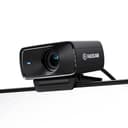
Elgato Facecam MK.2

Elgato Facecam MK.2

The streamer's webcam. Crisp 1080p60 with HDR, a proper glass lens, and Elgato's Camera Hub software that gives you real manual control over exposure and white balance — the thing generic webcams never let you touch. If you stream and want your face to look deliberately good, this is the pick.

Best for streamers
$139.99 · View on Amazon

Price as of July 28, 2026. #ad How we’re funded

2
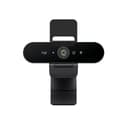
Logitech Brio 4K

Logitech Brio 4K

The webcam to buy when a real camera is overkill but a laptop cam is embarrassing. 4K capture, HDR that handles a bright window behind you, and Windows Hello face login. It is the top of the plug-and-play webcam world — beyond it, you are into mirrorless-as-webcam territory.

Best 4K
$168.50 · View on Amazon

Price as of July 28, 2026. #ad How we’re funded

3
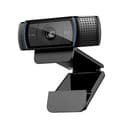
Logitech C920 HD Pro

Logitech C920 HD Pro

The default budget webcam, and still the right answer for most people who just need to look presentable on calls. Reliable 1080p, works with everything, and cheap. It won't wow anyone, and it needs decent lighting to shine — but as a no-drama upgrade over a laptop camera, it is unbeaten value.

Best value
$68.00 · View on Amazon

Price as of July 28, 2026. #ad How we’re funded

4
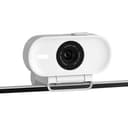
Elgato Facecam Neo

Elgato Facecam Neo

The cheap Elgato webcam that still gets the software. It brings Camera Hub controls and a privacy shutter at a budget price, trading the MK.2's glass lens and 60fps for a plastic lens and 1080p. A smart pick if you want Elgato's control without the streamer price.

Best budget with control
$39.99 · View on Amazon

Price as of July 28, 2026. #ad How we’re funded

The picks in full

#1Best for streamers

Elgato Facecam MK.2

The streamer's webcam. Crisp 1080p60 with HDR, a proper glass lens, and Elgato's Camera Hub software that gives you real manual control over exposure and white balance — the thing generic webcams never let you touch. If you stream and want your face to look deliberately good, this is the pick.

Strengths

  • Sharp 1080p60 with HDR and a quality glass lens
  • Full manual exposure and white-balance control in software
  • Onboard memory saves your settings

Trade-offs

  • 1080p, not 4K
  • No built-in microphone
Resolution1080p60, HDR
ControlManual exposure/white balance (Camera Hub)
MicNone (use a dedicated mic)
ConnectionUSB-C

Specifications read from the manufacturer listing, on July 18, 2026.

#2Best 4K

Logitech Brio 4K

The webcam to buy when a real camera is overkill but a laptop cam is embarrassing. 4K capture, HDR that handles a bright window behind you, and Windows Hello face login. It is the top of the plug-and-play webcam world — beyond it, you are into mirrorless-as-webcam territory.

Strengths

  • 4K capture with HDR for tricky backlighting
  • Adjustable field of view and Windows Hello login
  • Genuinely plug-and-play across apps

Trade-offs

  • Still a small-sensor webcam — a real camera looks better
  • Software can be heavy on system resources
Resolution4K30 / 1080p60
FeatureHDR, adjustable FOV, Windows Hello
MicDual noise-canceling
ConnectionUSB-C

Specifications read from the manufacturer listing, on July 18, 2026.

#3Best value

Logitech C920 HD Pro

The default budget webcam, and still the right answer for most people who just need to look presentable on calls. Reliable 1080p, works with everything, and cheap. It won't wow anyone, and it needs decent lighting to shine — but as a no-drama upgrade over a laptop camera, it is unbeaten value.

Strengths

  • Reliable 1080p that works with every app
  • Cheap and endlessly available
  • Dual built-in mics are fine for calls

Trade-offs

  • Needs good lighting to look its best
  • 1080p30 only; no HDR
Resolution1080p30
MicDual stereo built-in
MountClip and tripod thread
ConnectionUSB-A

Specifications read from the manufacturer listing, on July 18, 2026.

#4Best budget with control

Elgato Facecam Neo

The cheap Elgato webcam that still gets the software. It brings Camera Hub controls and a privacy shutter at a budget price, trading the MK.2's glass lens and 60fps for a plastic lens and 1080p. A smart pick if you want Elgato's control without the streamer price.

Strengths

  • Camera Hub software control at a low price
  • Built-in privacy shutter
  • Clips neatly to a monitor

Trade-offs

  • Plastic lens; 1080p at lower frame rate than the MK.2
  • No built-in mic
Resolution1080p (Full HD)
FeaturePrivacy shutter, Camera Hub control
MicNone
ConnectionUSB-C

Specifications read from the manufacturer listing, on July 18, 2026.

Webcam or a real camera?

A webcam is plug-and-play and perfect for streaming, calls and tutorials. A real mirrorless camera looks better — more background blur, better low light, nicer color — but it needs a capture card to appear as a webcam, plus a power supply and a mount. If you already own a good camera, that route is worth it; if not, a quality webcam plus good light gets you most of the way for far less hassle.

Whichever you pick, pair it with a decent USB microphone— clean audio does more for a stream than any webcam upgrade.

Frequently asked questions

Do I need a 4K webcam?

Usually not. Most streaming platforms and video calls cap at 1080p or downscale anyway, so 4K mainly helps if you crop in. A sharp 1080p webcam in good light beats a 4K one in poor light. Spend on lighting before chasing 4K.

Why does my webcam look washed out or dark?

Most webcams auto-adjust exposure and get it wrong in tricky lighting. Webcams with software control (like the Elgato Facecam range) let you lock exposure and white balance for a consistent look. And adding a key light fixes the underlying problem — poor light.

Webcam or mirrorless camera for streaming?

A webcam is simpler and cheaper and looks great with good light. A mirrorless camera plus a capture card looks better — more blur, better low light — but costs more and needs a power supply and mount. If you already own a camera, use it; otherwise a good webcam is plenty.

Do these webcams have built-in microphones?

The Logitech models do (fine for calls), but the Elgato Facecam models don't — Elgato assumes you'll use a dedicated microphone, which sounds far better. For streaming, a separate USB mic is worth it regardless.

What's the best budget webcam?

The Logitech C920 remains the value benchmark: reliable 1080p that works with everything, cheap, and a genuine upgrade over any laptop camera. The Elgato Facecam Neo adds software control if you want it for a little more.

Sources

Keep reading