Wide Open. Gear

The Best Teleprompters

Read your script while looking straight down the lens — integrated-screen desktop rigs and tablet-based beam splitters.

By Stephen V.Last updated How we pick

A teleprompter lets you read a script while looking straight down the lens, so you keep eye contact with your audience instead of glancing at notes. For scripted content — explainers, courses, corporate videos, news-style delivery — it’s the difference between sounding rehearsed and sounding natural, and it saves enormous time in editing.

There are two kinds. An integrated-screenprompter (like the Elgato Prompter) has its own display and mounts in front of the lens, controlled by software — compact and simple. A beam-splitterprompter uses a phone or tablet you already own, reflected off angled glass, which is cheaper and scales to bigger screens but is bulkier. We’ve picked the best of both, by budget and setup.

How this is funded:we earn a commission if you buy through our links, at no extra cost to you. It never changes which product we recommend, and we’ll tell you plainly when to skip one. Full disclosure.

Quick picks

Ranked on published specs and buyer fit. Select a row to jump to the full write-up. We have not tested these products — here is exactly what we do instead.

#ProductBest forPrice
1
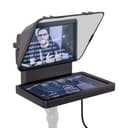
Elgato Prompter

Elgato Prompter

The teleprompter that finally makes the desktop kind simple. A compact screen mounts in front of your lens, and Elgato's software scrolls your script — or mirrors any window — while you look straight down the barrel. The integration with a streaming setup is the draw; it is small, clever and genuinely easy to live with.

Best integrated screen
$272.91 · View on Amazon

$299.999% off

Price as of July 28, 2026. #ad How we’re funded

2
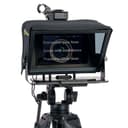
Glide Gear TMP100

Glide Gear TMP100

The classic beam-splitter teleprompter that uses a tablet or phone you already own. A 70/30 glass reflects your script back at you while the camera shoots straight through it. No proprietary screen to buy — you supply the device and a free prompter app. Bulkier than the Elgato, but flexible and cheaper.

Best tablet prompter
$194.00 · View on Amazon

Price as of July 28, 2026. #ad How we’re funded

3
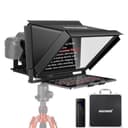
Neewer X12 14-inch Teleprompter

Neewer X12 14-inch Teleprompter

A bigger beam-splitter prompter for larger tablets, with a remote and a companion app. The 14-inch aluminum frame takes an iPad-sized screen, so your script sits large and readable for longer takes. A solid middle ground for talking-head video and online teaching where you read a lot of copy.

Best for larger tablets
$159.99 · View on Amazon

Price as of July 28, 2026. #ad How we’re funded

4
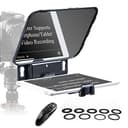
Desview T3 Teleprompter

Desview T3 Teleprompter

The affordable beam-splitter prompter for phone and smaller-tablet shooters. It supports devices up to about 10 inches, includes a Bluetooth remote, and keeps things simple and cheap. If you want to try shooting with a prompter before committing real money, start here.

Best budget
$89.90 · View on Amazon

Price as of July 28, 2026. #ad How we’re funded

The picks in full

#1Best integrated screen

Elgato Prompter

The teleprompter that finally makes the desktop kind simple. A compact screen mounts in front of your lens, and Elgato's software scrolls your script — or mirrors any window — while you look straight down the barrel. The integration with a streaming setup is the draw; it is small, clever and genuinely easy to live with.

Strengths

  • Built-in screen mounts directly in front of the lens
  • Software scrolls scripts or mirrors any window
  • Compact and integrates with Elgato's ecosystem

Trade-offs

  • Small screen suits a desk, not a room-scale shoot
  • Premium price for the convenience
TypeDesktop teleprompter with built-in screen
ScreenBuilt-in 9-inch display
SoftwareScrolls scripts or mirrors any app window
ConnectionUSB-C

Specifications read from the manufacturer listing, on July 18, 2026.

#2Best tablet prompter

Glide Gear TMP100

The classic beam-splitter teleprompter that uses a tablet or phone you already own. A 70/30 glass reflects your script back at you while the camera shoots straight through it. No proprietary screen to buy — you supply the device and a free prompter app. Bulkier than the Elgato, but flexible and cheaper.

Strengths

  • Uses a phone or tablet you already own
  • Quality 70/30 beam-splitter glass
  • No assembly and a carry case included

Trade-offs

  • Bulkier than an integrated-screen prompter
  • You supply the device and prompter app
TypeBeam-splitter teleprompter (tablet/phone)
Glass12-inch 70/30 beam splitter
DeviceBring your own phone or tablet
IncludesCarry case, no assembly

Specifications read from the manufacturer listing, on July 18, 2026.

#3Best for larger tablets

Neewer X12 14-inch Teleprompter

A bigger beam-splitter prompter for larger tablets, with a remote and a companion app. The 14-inch aluminum frame takes an iPad-sized screen, so your script sits large and readable for longer takes. A solid middle ground for talking-head video and online teaching where you read a lot of copy.

Strengths

  • Fits larger, iPad-sized tablets for readable text
  • Includes remote control and companion app
  • Sturdy aluminum build with a carry case

Trade-offs

  • Bigger and heavier to set up
  • Bring your own tablet
TypeBeam-splitter teleprompter (tablet)
Frame14-inch aluminum alloy
ControlRemote and app
IncludesCarry case

Specifications read from the manufacturer listing, on July 18, 2026.

#4Best budget

Desview T3 Teleprompter

The affordable beam-splitter prompter for phone and smaller-tablet shooters. It supports devices up to about 10 inches, includes a Bluetooth remote, and keeps things simple and cheap. If you want to try shooting with a prompter before committing real money, start here.

Strengths

  • Low price for a real beam-splitter prompter
  • Bluetooth remote included
  • Supports phones and tablets up to ~10 inches

Trade-offs

  • Smaller glass than pricier rigs
  • Bring your own device and app
TypeBeam-splitter teleprompter (phone/tablet)
DeviceUp to ~10-inch tablet
ControlBluetooth remote
IncludesWide-angle support

Specifications read from the manufacturer listing, on July 18, 2026.

Integrated screen or bring your own tablet?

The Elgato Prompter’s built-in screen is the tidiest, most desk-friendly option, and it integrates with a streaming setup — but the screen is small, so it suits close-up desk work. A tablet-based beam splitter gives you a bigger, more readable script and costs less (you supply the device), at the cost of extra bulk. If you read long scripts, the bigger tablet rigs are easier on the eyes.

A teleprompter pairs naturally with a webcam or a camera and good lightingfor a complete talking-head setup. Whichever you choose, the free scrolling app you use matters as much as the hardware — the simple, well-supported ones win.

Frequently asked questions

How does a teleprompter work?

Angled semi-reflective glass sits in front of the camera lens. Your script displays on a screen below (or a built-in screen), and the glass reflects it back to you at eye level while the camera shoots straight through the glass. You read while looking at the lens.

Do I need a special screen, or can I use my phone?

Both exist. Integrated-screen prompters like the Elgato have their own display. Beam-splitter prompters use a phone or tablet you already own with a free prompter app — cheaper, and you can use a bigger screen for longer scripts.

What's the best teleprompter for a beginner?

For a simple desk setup, the Elgato Prompter is the tidiest and easiest, especially in a streaming ecosystem. On a budget, a tablet-based beam splitter like the Desview T3 does the same job for less if you already own a phone or tablet.

Will a teleprompter work with any camera?

Beam-splitter prompters mount most cameras and phones that fit behind the glass. Integrated-screen prompters like the Elgato are designed to sit in front of a webcam or small camera at a desk. Check the mount and weight limits against your camera.

Does the scrolling software matter?

Yes — a lot. The hardware just holds the screen; the app scrolls your script, sets speed and mirrors the text. Simple, well-supported apps make the experience smooth; fiddly ones make it frustrating. This is worth checking before you buy.

Sources

Keep reading